I've put together this rather rambling page of useful info, formulae & figures for people who know the basics of film photography & photochemistry, and want to design & build their own pinhole cameras. Although much of the information below is quite technical, it's not absolutely necessary to follow it exactly. Good results can be obtained simply by trial & error and "happy accidents" occur sometimes too! For beginnners, I would suggest that you avoid all of the hassle and expense of film, and start by making photographic paper negatives. Pinhole photography is all about "making your own". It's part of the fun & anyone can do it. Of course, if you have advanced technical, artistic or construction skills, then you can make the camera as beautiful or complex as you like. But don't forget that some of the most interesting photographs are made with a simple cardboard tube, hand-pricked pinhole and guessed exposure!
pinhole size
To make a pinhole camera, you need to start with a pinhole, obviously! But for most cameras the hole will need to be a lot smaller than the diameter of most sewing pins, and similar to the size of an acupuncture needle, that is typically 0.1 to 0.5mm.
You might think that the pinhole should be as tiny as possible as this will create the sharpest image. Theoretically, this is true up to a point, but light has certain properties of a wave (think ripples on a pond) which cause it to spread out when the wave reaches a narrow gap. This property is known as diffraction, and it is the bluriness caused by this which sets a lower limit for the useable size of the pinhole.
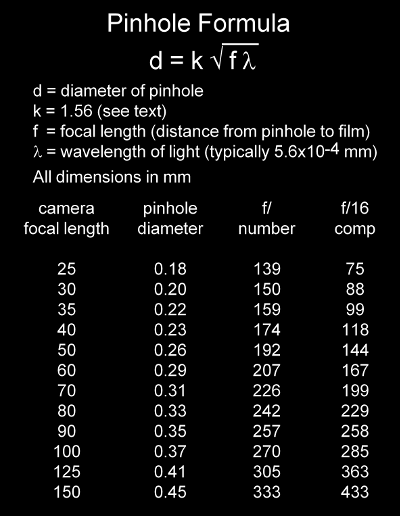
The table below gives pinhole diameters and resultant aperture f/number for typical camera sizes & is a good practical reference for general use. If using a light meter set to f/16, multiply the exposure reading by the figure in the f/16 comp column.
The value of k = 1.56 has been arrived at by various theoretical means: photographic pioneer Lord Rayleigh used a value of 1.9, though anything between 1.2 - 2.0 is ok. The optimum pinhole size also depends on the scale of the object being photographed on the film itself. For very close-up photos, the pinhole size should be reduced by about 20%. What this means in practice is that there's an acceptable, and quite wide, margin of error. The actual size isn't critical, though it helps to get it within about 30% of the intended value. It's much more important to know what size you've actually ended up with, as this affects the f/number and hence the exposure time.
Remember that all of these figures are based on achieving the sharpest image. But don't lose track of the fact that you're making a pinhole camera: all that's important is to get an image. Just learn to embrace the errors and "happy accidents" which are part of the fun of any creative process!
making your own pinhole: materials & technique
Whatever you do, do not buy one of those "hi-tech, laser etched, plasma punctured" pinholes which seem to be advertised everywhere these days. They're expensive, pointlessly so, and are simply a cynical attempt by opportunistic manufacturers to impose their consumerist values on pinhole photography. Instead, just make your own. You'll save cash and learn something in the process!
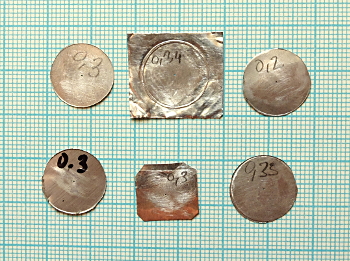
The pinhole should be made in a material which is thin, opaque and soft enough to be pierced easily. Aluminium sheet is ideal and is generally available at your corner shop in a form which comes with free beer! Save the beer for later, as you need a clear head for this bit. Cut out a small piece from a flat part of the can (avoiding embossed logos, etc) & hold it on a hard surface. Using an ordinary sewing needle held firmly in a pair of pliers, pierce the centre of the aluminium while rotating the sheet beneath it. This is much easier than holding the aluminium still & twisting the needle. All that's required is to pierce the material. Don't go too deep. Then, flip over the sheet and gently sand away the back of the hole using a piece of 400 grade wet & dry paper. Sand just enough to remove the burr, blow out the dust, then the pinhole can be checked.
getting it the correct size
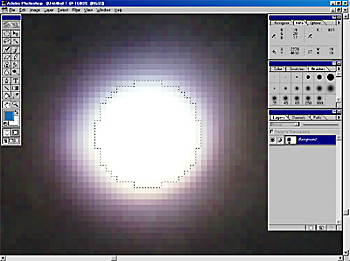
To inspect your work, a simple pocket microscope with graticule is ideal, but if such a tool isn't to hand, a computer scanner will do almost as well. The scan should be made in "film scanning" mode, with backlight on, at maximum resolution. (BUT most flatbed scanners are limited to a maximum optical resolution of about 2000 pixels per inch (ppi), even if they claim to offer far more. So use no higher that the 2400 dpi/ppi setting.) When zoomed in, the pixellation of the image can be used to measure the pinhole diameter. At 2400 pixels per inch, one pixel = 0.0106mm. If you're using Photoshop or similar, you can use the circular marquee tool to select the pinhole, and let it do the counting for you, as shown in the photo above.
You'll probably need to sand some more, and even prick the hole again with the needle to get it as circular as possible. (If the hole goes over-size, mark it with the measured diameter & save for another day & another pinhole camera project.) A useful method of cleaning out the hole is to use a short length of wire of the correct diameter. You will need to be able to measure this (or read the size from the cable reel). 0.2mm diameter is a very common size for individual strands of flexible wire.
other materials
For wide angle cameras, the thickness of the material can affect the performance at the edges of the frame. Beer can* is usually about 0.1mm thick, and a slightly thinner variant is the foil used in take-away food containers. It's a bit more fiddly to work with, but otherwise is ideal. The square pinholes in the photo above were made from the base of a 0.05mm foil food tray. Kitchen foil, though thinner still, is too fragile to be worked without tearing, but you could try...
* If you've not read Robert Pirsig's Zen and the art of motorcycle maintenance, read it NOW. Then the absolute suitability of this everyday material for the purpose will be confirmed.
calculating the exposure
OK. So you have the pinhole and know its diameter. If your camera & pinhole combination is one of those shown in the table at the top of the page, you can simply read the aperture f/number there.
To calculate the f/number, simply divide the focal length by the pinhole (lens) diameter. E.g. for a 50mm camera, that's 50/0.26 = f/192. That's why the "f/number" is written that way. In a pinhole camera the focal length is always the distance between the pinhole and the film. (If the same pinhole is used in a different camera, eg 100mm, its f/number changes to become 100/0.26 = f/384 (which, in photographic terms, is 2 stops (2 squared) smaller because the same amount of light is spread over 4 times the area.)
Knowing the f/number, you can put this into a handheld exposure meter & read off the required exposure in seconds for whatever film you are using. If the meter won't handle an aperture that tiny, the best option is to meter for f/16 and multiply the reading by a compensation value. For typical pinhole cameras, this is shown in the "f/16 comp" column of the table above. To calculate, it's simply the square of the pinhole f/number divided by the square of the reference f/number. So, for a pinhole of f/192, that's (192x192) / (16x16)= 144 times. E.g. If metering at f/16 gives 1/64second. The exposure for the pinhole is (1/64) x 144 = 2.25 seconds.
measuring the exposure
Light levels are most accurately measured using an incident exposure meter. This detects the light falling on the scene and so is independent of your subject. If you don't have an exposure meter some mobile phones can run light meter applications. I can't vouch for the accuracy of these, but they're worth a try. You can also use what's known as the "sunny 16 rule" to get a fairly good approximation of the correct exposure at f/16. In midday full sunlight, with an aperture of f/16, you need an exposure of 1/(film ISO speed). Double this for hazy sunshine, x4 for overcast / light cloud, x8 for heavy cloud.
E.g. for Ilford Delta 100, in light cloud that's 1/100 second x 4 = 1/25 second exposure. Now, just as you would if using an exposure meter, you can use the f/16 compensation given in the table at the top of the page to arrive at the correct exposure for your pinhole & camera combination. However, if you are using film, and the exposure works out to more than a few seconds, you will get very thin negatives unless you compensate for what is known as "reciprocity law failure" - See below.
photographic film or paper negatives?
Film is becoming increasingly expensive and, for pinhole cameras, photographic printing paper is a good alternative offering several advantages. The tonal range of paper is not as great, and the highlights tend to crush, but it's simpler and quicker to process. You also get to make cheap, large negatives which work well in simple can or cardboard box cameras. Photo paper is less sensitive than film but this is offset by the fact that it doesn't suffer from the complex reciprocity error discussed below: the exposure you measure is the exposure you need! Many of my pinhole photos are made using Ilford Multigrade IV paper, which can be dish-developed in around 2 minutes. Measure the light levels as above, but treat the paper as having a sensitivity of ISO 12 (in daylight). You can make contact prints from the paper negatives, but these days it's easier to scan, invert and adjust contrast with software: a marriage of new and old technologies.
photographic film & reciprocity law failure
Usually with photographic film & other light sensitive materials, we make the assumption that the exposure time is doubled for each halving of the light level. ie 1/2 light => 2/1 exposure. One figure is the reciprocal of the other, and the rule is known as the reciprocity law. It holds true most of the time from exposures of hundredths of a second to around a second or so - as used in most cameras.
In a pinhole camera, because the aperture is so small, very little light reaches the film and so the exposure time is correspondingly large, typically ranging from a few seconds to many minutes or even hours. In this low-light situation, most films lose sensitivity and don't "see" as much light as they should, hence the term "reciprocity law failure", and the exposure time has to be lengthened to compensate for this. An added problem is that, because the error is greater in the shadow areas than in the highlights, we end up with increased contrast overall. The best we can do is to compensate sufficiently to maintain some detail in the shadows, while allowing the highlights to do what they will.
The required compensation varies from film to film, and is not easy to determine because it depends also on the tonal range of the subject. Sometimes manufacturers include details in their technical data sheets for the films, though this tends to be quite vague as they don't specify whether they are correcting for mid-tones or shadows.
Compensation can be shown in tables, graphs, or given by the formula: T=Tmr where T= compensated time, Tm=measured time. For Ilford Delta 100, r=1.48 (from Ilford's original recommendation, though they recently changed this to r=1.26.)
Figures aside, one of the reasons why I always use Ilford Delta 100 film for pinholing is that it is very tolerant of over-exposure, and in this situation the highlights crush gracefully, still maintaining some detail. Because my pinhole photos tend to have large areas of shadow and blurred highlights, I've adopted Ilford's original recommendation as given in the table below. All of the film pinhole photos on this website, including those for Road Movie 52nd Parallel, were taken with these values. (Films developed in Ilford Perceptol, 1:1 17min @ 20°C)
Note that the "measured exposure" in the table corresponds to that obtained using an incident light meter or the sunny 16 rule.
Ilford Delta 100 long-exposure compensation | |
measured exposure | compensated exposure |
1s | 1s |
2s | 3s |
4s | 8s |
8s | 22s |
16s | 1m |
30s | 3m |
1m | 7m |
2m | 20m |
4m | 1h |
8m | 2.5h |
16m | 7h |
This table can also be used as a starting point for other black & white films, but most colour films don't follow this table too well & you end up with strange colour shifts, though the effect can be interesting... If you want accurate colour, by far the best choice is Fuji Provia 100 colour transparency film which maintains its accuracy without requiring any compensation up to about 2 minutes. It requires E6 processing though, which most high-street labs no longer offer. It's also expensive, which can take the fun out of the experimental nature of pinhole photography!
... and finally
If you've got this far, you can now treat yourself to that glass of warm & rather flat beer which you poured earlier - remember? You're also probably wondering how to keep track of all of these figures when out in the field. Don't forget that you only need to calculate once for your particular choice of pinhole, camera and film type, then simply print a table on a piece of paper & attach this to the pinhole camera itself.
The procedure when working is then simply: meter - look at table - count the exposure. Done!
Happy pinholing!
Page created July 2011. Re-written in HTML5 August 2022. Reciprocity law failure & minor updates May 2023.